
Free · no ads · no tracking
The overlay editor for OBS and Twitch
Build your stream overlay in the browser, add it to OBS as a browser source and control counters, alerts, timers and quizzes live – on your computer, your phone or with a Stream Deck.
By clicking “Sign in with Twitch” you accept the terms of use and the privacy policy.
Sign in with TwitchView all features
Riglayer is free. After you sign in, an admin approves your channel. Twitch shows you beforehand exactly which permissions Riglayer gets (for example manage channel, read and write chat, read followers and subscriptions, your email address for status emails).

The Riglayer community on Discord
Questions, bugs or wishes? The Riglayer Discord has forums for help, bug reports and feature requests, a channel with news and conversation with other streamers. Twitch affiliates and partners automatically get the Streamer role there as soon as they connect their account in Riglayer.
What is Riglayer?
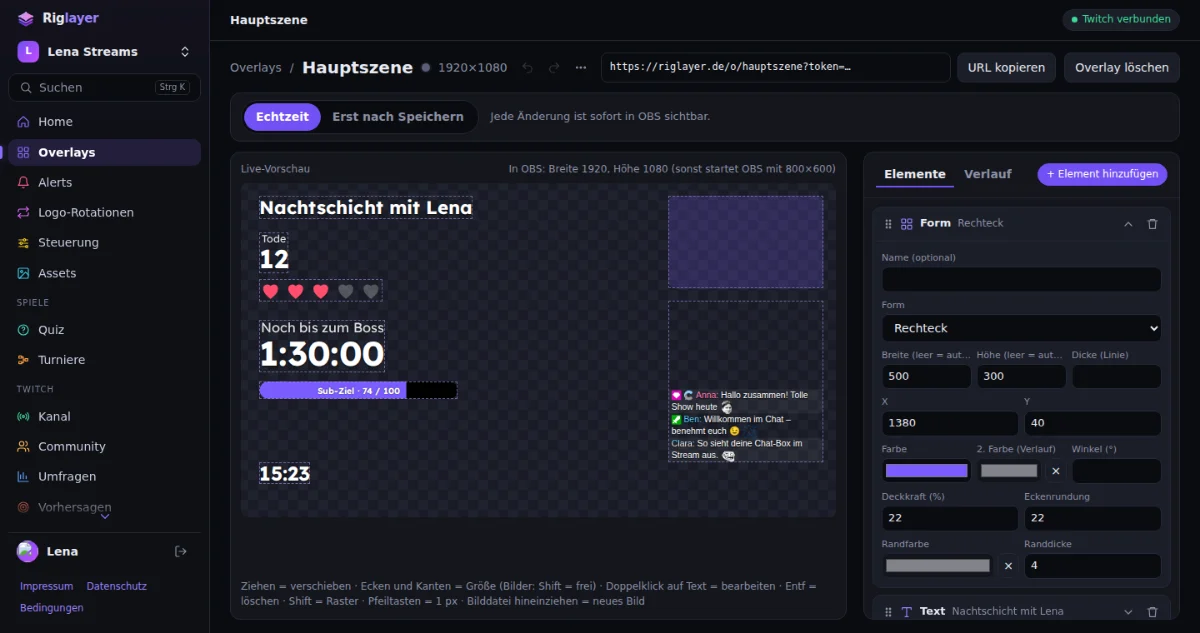
Riglayer is an overlay editor for OBS and Twitch that runs in your browser. You place text, images, counters, timers, Twitch chat, alerts, quizzes and tournament brackets on a canvas and add your overlay's address to OBS as a browser source. What you change in the editor appears in OBS immediately – or only when you click “Save”. During the broadcast you control counters and timers via chat command, on your phone, with hotkeys or with the Stream Deck.
You don't need to install anything for the editor. Riglayer is built for streamers who want their own overlay without having to set up a program for it.
What Riglayer can do
Overlay editor in your browser
Place elements freely, sort layers, undo changes – no installation needed.
Live sync with OBS
Add it as a browser source in OBS; changes appear immediately or only after “Save”.
Twitch alerts
Follow, sub, resub, gift subs, bits, channel points, raid and hype train – with image, GIF and sound.
Chat box with emotes and badges
Twitch chat live on stream – with Twitch, 7TV, BTTV and FFZ emotes, badges and name colors.
Counters, timers and chat commands
Death counter, scores and timers – controllable via chat command, phone, hotkeys or Stream Deck.
Quiz and tournaments
Viewers answer in chat; tournaments as a knockout bracket or round robin.
OBS control
Switch scenes, mute audio, start stream and recording – from your phone or by your team.
Team, rights and log
Roles with individually selectable rights, invite links and automatic roles for Twitch mods and editors.
Channel tools and statistics
Title, category, raids, shoutouts, polls, predictions, clips – and numbers about your broadcasts.
Guides to get you started
Add an overlay to OBS: how to set up the browser source
Create an overlay, copy the link, add it to OBS as a browser source – including size, live sync and sound.
Death counter for OBS and Twitch: via chat command, phone and Stream Deck
Create a score, set a chat command like !deaths, control it from your phone, hotkeys or Stream Deck.
Create Twitch alerts for OBS: follow, sub, bits, raid and more
Create an alert, set up events with text, image and sound, test it, add it to the overlay.
Twitch quiz on stream: viewers answer in chat
Create questions, show the quiz as an overlay, run it with one button – answers come from chat.
Get started in three steps
Sign in with Twitch
All you need is your Twitch account. An admin approves your channel; if you like, Riglayer sends you a status email.
Build an overlay
Create an overlay, add elements and arrange them in the live preview.
Add it to OBS
Copy your overlay's link and add it to OBS as a browser source. From then on OBS follows your changes.
Who is Riglayer for?
- Twitch streamers: an overlay with chat, alerts, counters and timers that you maintain on your own.
- Teams and moderators: helpers operate counters, quizzes or OBS without sharing your account; you decide the rights.
- Community events: quizzes with answers from chat and tournament brackets for game nights.
- Channels with partners: logo rotations for sponsors, partners and charity campaigns.
Free, no tracking, in control of your data
- Riglayer is free and shows no ads.
- There are no tracking or analytics services; cookies are only used for your sign-in and, if you choose the language yourself, for that choice.
- Twitch shows you every permission before you sign in; you can disconnect at any time on Twitch.
- You can export your data and delete your account at any time.
- The fonts are hosted on our own server, not at Google. The hosting provider is STRATO GmbH from Berlin.
Frequently asked questions
What is Riglayer?
Riglayer is an overlay editor for OBS and Twitch that runs in your browser. You place text, images, counters, timers, chat, alerts, quizzes and tournament brackets on a canvas and add your overlay's address to OBS as a browser source. Changes appear live in OBS. You don't need to install anything for the editor.
Is Riglayer free?
Yes. Riglayer costs nothing, contains no ads and has no payment features; none are planned either. It is a private project that is not run for profit.
How do I get access?
You sign in with your Twitch account. An admin then reviews your channel and approves it. Riglayer can notify you by email about approval or rejection; you can turn these emails off in the settings. Signing in with Twitch is the only way to create an account.
How do I add an overlay to OBS?
Create an overlay in Riglayer and copy its link. In OBS, add a “Browser” source under Sources, enter the link as the URL and set width and height to the overlay's size, usually 1920 × 1080. After that, all changes from the editor appear in OBS without reloading the source.
What is the difference between “Real time” and “Only after saving”?
In “Real time” mode OBS shows every change immediately. In “Only after saving” mode OBS shows only the last saved version while you rebuild in the editor; the new version only goes live with “Save” (Ctrl+S). Counters, timers, videos and sounds stay controllable immediately in both modes. You set the mode for each overlay individually.
Which alerts are there?
Riglayer shows follows, subs, resubs, gift subs, bits, channel point redemptions, raids and hype trains. Each event has its own texts, an optional image or GIF, a sound and a minimum amount. A queue can be paused, skipped and cleared.
Can I control counters like a death counter via chat, phone or Stream Deck?
Yes. Chat commands like !deaths, !deaths +3 or !deaths set 10 change a counter; you decide who may use them. The “Controls” page has big buttons for your phone and can be installed as an app. For Stream Deck and similar devices Riglayer creates ready-made links for every action.
Ready for your overlay?
By clicking “Sign in with Twitch” you accept the terms of use and the privacy policy.